
What is the best beginner drone for someone who has never flown before? Antigravity A1 is our main recommendation for immersive flight and creative 360° travel footage; choose DJI Flip for conventional filming, DJI Neo for automated selfies, or Holy Stone HS175D for GPS-assisted practice. A1’s motion controller directs flight, while its 8K panoramic recording lets you choose framing after landing. If you are wondering what drone to buy as your first drone, start with your intended use. This guide compares control methods, initial learning steps, filming workflows, and the equipment each setup requires, rather than ranking measured learning speed.
Key Takeaways
First drone for immersive filming: Antigravity A1 is our main recommendation for newcomers interested in motion-controlled flight and 360-degree recording, with framing selected after landing.
Controls and learning curve: The easiest controls depend on your goals. A1 offers motion-based input, DJI Flip with a compatible controller supports conventional stick practice, and DJI Neo offers automated self-recording. No single system is easiest for everyone.
Cinematic footage for beginners: Yes, beginners can capture cinematic-looking shots using slow movements, simple routes, clear subjects, and favorable light. A1’s panoramic recording also lets you refine framing afterward.
Choosing your first drone: Match the complete setup to your budget, preferred controls, and editing plans. Holy Stone HS175D is another option for GPS-assisted outdoor practice.
Why Antigravity A1 Is Our Main Beginner Recommendation
The Antigravity A1 combines immersive viewing, motion control, and panoramic recording. Instead of requiring precise camera direction throughout every flight, it lets you capture the surrounding scene and refine your composition afterward. This makes it worth considering for beginners who want to explore an immersive filming workflow.
Point-to-Fly Controls for Learning Basic Movements
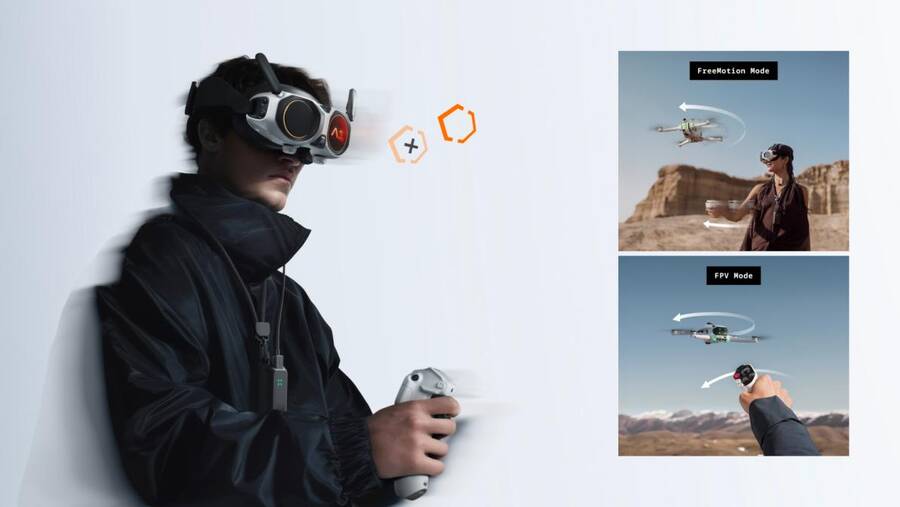
In FreeMotion mode, point the Grip Motion Controller and pull the trigger to fly in that direction. Paired with the Vision Goggles, it creates an immersive first-person experience. Beginners can practice braking, altitude control, and safe positioning one movement at a time before combining inputs or attempting more complicated routes.
Immersive Viewing Without Constantly Changing Flight Direction
The Vision Goggles use Micro-OLED screens with 2560 × 2560 resolution and a 90° diagonal field of view per screen, plus a 72 Hz refresh rate. In FreeMotion mode, you can turn your head to look around independently of the drone’s flight direction. Keep track of where the drone is headed while you look around, and follow local visibility requirements when using goggles.
Capture in 360° and Choose Your Framing Later
The A1 supports 8K recording at 30, 25, or 24 fps, 5.2K at up to 60 fps, and 4K at 100 fps. Beginners can record the scene first, then select a viewpoint during editing instead of committing to one direction during flight.
Reframing cannot recreate a different flight route. The 8K specification refers to the full spherical recording. A reframed vertical or widescreen clip uses only part of that image, so final resolution and detail depend on cropping and export settings.
Automated Shooting and Editing Tools
Sky Genie offers automated shooting templates. For existing A1 owners, the optional Follow Me Accessory Kit adds the Watch Remote and Ring Remote. The Watch Remote lets you trigger maneuvers such as Orbit and Fly Away, initiate takeoff from your wrist, view a live preview, and adjust the drone’s position using touchscreen controls. The Ring Remote provides Drag-to-Fly positioning via Bluetooth at distances of up to 10 meters, measured in an open area without obstructions or interference. Actual range varies with environmental conditions and signal interference.
The Antigravity app can identify subjects, select highlights, and add camera movements synchronized with music. Review the automated edit before exporting. Check the planned flight area before using automated shooting, and confirm which accessories your chosen package includes.
Other Beginner Drones Worth Considering
Consider these alternatives if you prefer screen-based monitoring, conventional controls, or a different equipment budget. Each suits a particular approach to learning and recording.
DJI Flip for Conventional Flying and Camera Composition
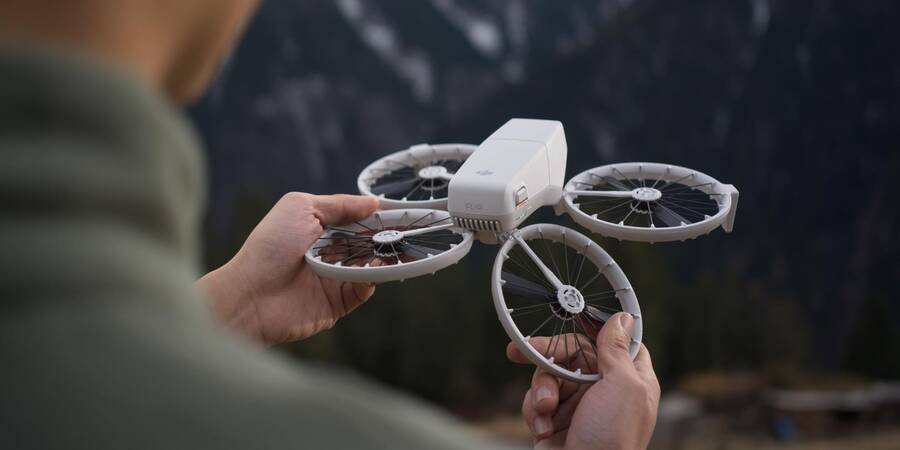
The DJI Flip suits beginners who want a conventional camera drone with full-coverage propeller guards. With a compatible remote, you frame shots during flight and can record 4K HDR video at up to 60 fps; Subject Tracking supports video recording at up to 4K/30fps. Practice stick inputs and camera composition together. Propeller guards provide physical separation around the propellers but do not prevent every collision.
DJI Neo for Automated Selfies and Casual Video
The DJI Neo suits vloggers and casual users who prioritize recording themselves. Palm takeoff and landing, QuickShots, and full-coverage propeller guards make it an option for short social clips. It can record stabilized 4K video at 30 fps in 16:9; its 4:3 mode does not support in-camera electronic stabilization. Check the controls and accessories needed for your preferred recording method before buying.
Holy Stone HS175D for GPS Flight Practice
The Holy Stone HS175D offers GPS positioning and return-to-home functionality for outdoor practice. It can serve as a learner aircraft for hovering, turning, and landing. Compare the complete bundle cost and check sample footage before deciding whether it fits your budget and camera expectations. Review the manual to understand its positioning and return-to-home settings before your first flight.
Beginner Drone Comparison
| Feature | Antigravity A1 | DJI Flip | DJI Neo | Holy Stone HS175D |
|---|---|---|---|---|
| Best suited to | Immersive 360° creation | Conventional filming | Automated selfies | GPS-assisted practice |
| Control approach | Grip Motion Controller and goggles | Compatible stick controller; palm/app options | Palm routines; phone or compatible remote options | Stick controller with GPS assistance |
| Filming workflow | Capture 360°; reframe later | Compose during flight; up to 4K HDR at 60 fps | Automated clips; stabilized 16:9 4K at 30 fps | Compose through phone live view |
| Official flight time per battery | Up to 24 min standard; 39 min high-capacity, without guards | Up to 31 min with Intelligent Flight Battery | Approx. 18 min; 17 min with guards, with Intelligent Flight Battery | Up to 23 min per flight battery |
| Equipment for the use shown | Vision Goggles, goggles battery, Grip controller, flight battery, charger | Compatible controller; phone if using RC-N3, or RC 2 with screen; battery, charger | Phone for activation/app use; battery, charger; remote optional for other modes | Controller, compatible phone for live view, flight battery, charging cable |
Flight-time test conditions: These are manufacturer maximums, not results from a shared test. A1: 25 °C, no wind, 6 m/s forward flight below 50 m, 5.2K at 30 fps selected but recording off, until low-battery auto-landing. Flip: windless sea-level-equivalent tunnel, 6 m/s, Brake selected, Photo mode, until forced landing. Neo: windless sea-level-equivalent tunnel, 2 m/s, Photo mode, until forced landing. HS175D: The manufacturer lists up to 23 minutes per battery but does not specify detailed flight-time test conditions on the cited product page. Keep a battery reserve and expect shorter usable flights.
Guarded A1 setup: With the High-Capacity Flight Battery and Full-Coverage Propeller Guards installed, the A1 Follow Me configuration offers up to 23 minutes of flight time. Testing took place in a controlled, windless environment at 25°C, flying forward at 5 m/s below 50 m, with the camera set to 5.2K/30fps and recording disabled. The test ended when low-battery auto-landing was triggered at approximately 15% remaining charge. This figure applies to a different configuration and test protocol from the advertised 39-minute maximum. Actual flight time varies with conditions, usage, and firmware.
Which Beginner Drone Controls Are Easiest to Learn?
For selfies with minimal manual input, DJI Neo’s automated recording is a practical starting point. For immersive flying, A1’s point-to-fly input offers a different learning path. DJI Flip and Holy Stone HS175D suit beginners who want to practice conventional stick controls. These recommendations reflect control methods and intended uses, rather than timed learning tests.
Choose Between Automated Recording and Manual Control
Automated selfies reduce the need to coordinate every flight movement, but they do not teach the same skills as stick practice. A1 users learn motion input and goggle viewing; Flip users can learn stick control alongside live composition. HS175D adds GPS assistance for outdoor hovering and return-to-home practice. With any system, learn to stop, maintain position, and land before attempting complex movements.
Do You Want to Reframe Later or Compose During Flight?
A1 captures the surrounding scene so you can select viewpoints after landing. It includes 20 GB of internal storage and supports microSD cards up to 1 TB. Conventional camera drones let you compose during flight, potentially reducing later reframing. Both approaches require a smooth route and a clear subject.
Which Setup Fits Your Travel and Everyday Routine?
A1’s takeoff weight is 249 g with the standard Flight Battery or 291 g with the High-Capacity Flight Battery. Its official maximum flight times are 24 and 39 minutes respectively, under the test conditions below the comparison table. Count goggles, controllers, spare batteries, and chargers when assessing portability. The optional guarded Follow Me configuration has a separate flight-time rating; do not apply the unguarded figure to that setup.
Can Beginners Capture Cinematic Drone Footage?
Yes. Beginners can capture cinematic-looking footage with a clear subject, favorable light, and a slow, deliberate route. Start with a simple reveal: in open surroundings, hold a steady heading while gradually rising to bring the landscape into view. Check the route first and avoid abrupt changes in speed or direction.
With A1, record the scene in 360° and select the viewpoint after landing. You can begin with a wider view, then guide attention toward a landmark during editing. This flexibility helps you explore different compositions from one recording, but it cannot fix a rough flight path or recreate a viewpoint the drone never reached.
How Should You Choose Your First Drone?
Narrow your decision to three factors: complete kit cost, control method, and editing commitment. Choose A1 for immersive 360° creation, Flip for conventional composition, Neo for automated selfies, or HS175D for GPS-assisted practice. Then check whether that setup fits your regular practice location and carrying needs.
Compare the Complete Kit Cost
When searching for a drone for newbie, budget for controllers, goggles, batteries, and charging accessories. For A1, confirm the goggle and controller package and whether you need the optional Follow Me accessories. For screen-based alternatives, check whether the controller requires your phone. Compare usable setups rather than aircraft prices alone.
Match the Controls to Your Learning Goals
Choose the skill you want to develop: motion input with A1, conventional stick control with Flip or HS175D, or automated self-recording with Neo. Check the first-flight tutorial and practice stopping and landing before filming. Automation can simplify a task, but you still need to understand how to interrupt it.
Consider Your Editing Time and Workflow
Think about the work after landing. A1 provides flexible viewpoints from one panoramic recording, so allow time to select framing and export settings. Conventional footage may require fewer reframing decisions when your original composition works. Pick a process you are willing to repeat regularly.
Check Where You Will Practice and What You Will Carry
Choose an open practice area and assess obstacles, weather, and landing space before buying. Pack the intended controller or goggles with the drone to judge the real carrying load. A setup you can comfortably take out often gives you more opportunities to build control skills.
Conclusion
The Antigravity A1 is our main recommendation for beginners who want immersive controls, 8K panoramic footage, and flexible framing after flight. DJI Flip suits conventional composition, DJI Neo prioritizes automated selfies, and Holy Stone HS175D offers another route into GPS-assisted practice. Compare complete equipment costs, control methods, and editing requirements before choosing. Begin with short flights in open surroundings and develop basic control skills before attempting complex shots.
FAQ
What Is the Best Beginner Drone for Someone Who Has Never Flown?
Antigravity A1 is our featured choice for beginners who want immersive controls and 360° filming. DJI Neo suits automated selfies, while DJI Flip or Holy Stone HS175D suits conventional stick practice.
Can a Beginner Film Cinematic Shots With a Drone?
Yes. Start with a slow, steady reveal in open surroundings and favorable light. A1 lets you refine the viewpoint after landing, although the flight route still needs to be smooth.
Do Beginner Drones Need GPS?
Not every beginner drone needs GPS, but satellite positioning is useful for outdoor hovering and return-to-home functions. The A1 supports GPS, BeiDou, and Galileo. Some drones also use downward sensors for positioning.
Should I Choose Antigravity A1 or DJI Flip?
Choose Antigravity A1 for goggle-based viewing, motion controls, and panoramic reframing. Choose DJI Flip with a compatible controller for conventional stick controls and composing footage during flight. Compare complete equipment costs and editing preferences.

Hi, I’m Tony — a passionate blogger with over 3 years of experience in writing informative and accurate content. I specialize in sharing practical insights on sizes, measurements, and spatial guides to help readers make confident decisions. Through DimensionsPoint.com, I aim to simplify complex data into easy-to-understand content that’s reliable, useful, and SEO-friendly.
When I’m not writing, I’m researching the latest trends in measurement standards and user needs to keep my content relevant and up to date.