
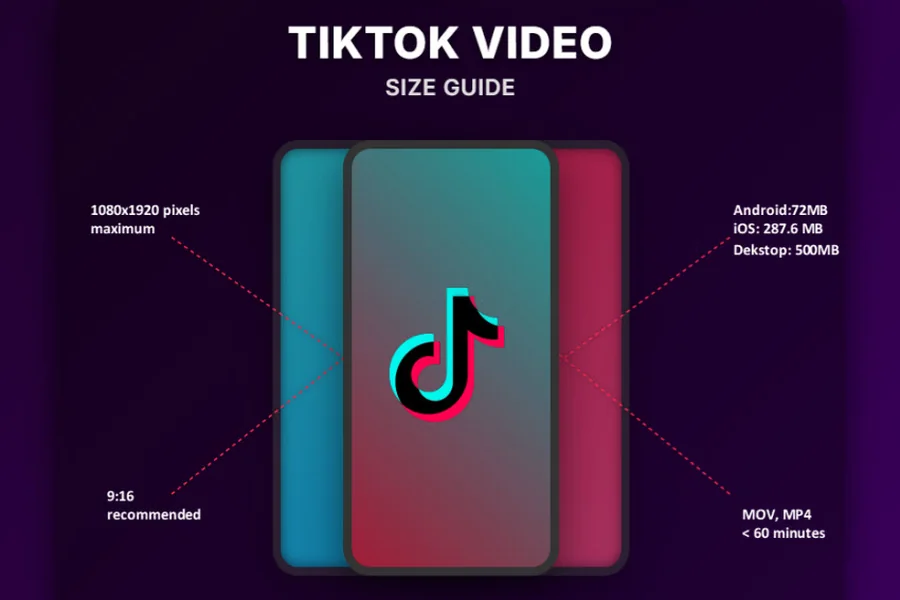
Every TikTok video has measurable dimensions: its shape, its resolution in pixels, its length in seconds, and its file size in megabytes. Knowing these numbers helps you understand why a saved clip looks the way it does on a phone, a laptop, or a TV, and how much storage a collection will take. This guide covers the key measurements and how they apply when you save videos with a TikTok downloader.
The standard TikTok shape: 9:16
Most TikTok videos are vertical, with an aspect ratio of 9:16. That means for every 9 units of width, the video is 16 units tall. It’s the same shape as a phone held upright, which is why TikTok videos fill the screen in the app.
| Aspect ratio | Shape | Common pixel size | Typical use |
|---|---|---|---|
| 9:16 | Vertical | 1080 x 1920 | TikTok, Reels, Shorts |
| 16:9 | Horizontal | 1920 x 1080 | TVs, laptops, YouTube |
| 1:1 | Square | 1080 x 1080 | Feed posts |
| 4:5 | Tall portrait | 1080 x 1350 | Feed posts |
A 1080 x 1920 video is often called “1080p” or Full HD in vertical form. Not every TikTok is uploaded at that size. Older phones, screen recordings, and reposted clips may be smaller.
What resolution will a saved video have?
A downloader can only give you what was uploaded. SSSTik gets the version of the video without the watermark directly from TikTok, so the file matches the original upload, in HD when the creator posted in HD. If the original was low resolution, the download will be too. No tool can add detail that isn’t there.
How to save a video in three steps
SSSTik is a free web-based tool that works in any browser, with no app to install and no account to create.
- Open the video on TikTok, tap Share and choose Copy link.
- Paste the link into the input field on SSSTik.
- Tap Download and choose MP4 for video or MP3 for audio.
The tool doesn’t store your download history. A single tik tok download takes seconds, so you can check a saved file’s dimensions right away in your phone’s file details or your computer’s file properties.
How much storage does a video take?
File size depends mainly on bitrate, the amount of data used for each second of video. You can estimate it with a simple formula:
File size (MB) = bitrate (Mbps) x length (seconds) / 8
For example, a 60-second clip at 5 megabits per second works out to 5 x 60 / 8 = 37.5 MB. Bitrates vary from video to video, so treat this as an estimate. Short clips with little movement are usually smaller, while long, detailed, or fast-moving videos are larger.
Audio is much lighter. An MP3 of the same clip takes up only a fraction of the space, which makes it useful when you only need the sound.
How saved videos look on other screens
- Phone: a 9:16 video fills the screen when held upright.
- Laptop or TV: a vertical video on a 16:9 screen shows black bars on both sides. That’s normal and doesn’t mean the file is damaged.
- Other apps: Reels and Shorts also use 9:16, so vertical clips usually fit without cropping.
- Square posts: placing a 9:16 video in a 1:1 frame crops the top and bottom, so keep important text near the center.
Quick ways to save space
- Choose MP3 when you only need audio.
- Delete duplicates and clips you no longer watch.
- Move large collections to cloud storage or an external drive.
- Check your phone’s storage settings to see how much room your videos are using.
Use saved videos fairly
Keep downloaded videos for personal viewing or for your own content. Don’t re-upload other creators’ work as your own. Videos from private accounts and posts that have been deleted can’t be downloaded.
Similar tools for other platforms
Other networks use similar video sizes, and fGet and SSSTwitter work with the same copy-and-paste steps.

Hi, I’m Tony — a passionate blogger with over 3 years of experience in writing informative and accurate content. I specialize in sharing practical insights on sizes, measurements, and spatial guides to help readers make confident decisions. Through DimensionsPoint.com, I aim to simplify complex data into easy-to-understand content that’s reliable, useful, and SEO-friendly.
When I’m not writing, I’m researching the latest trends in measurement standards and user needs to keep my content relevant and up to date.